
跨域请求 - 同源策略
Posted: 10.08.2019
同源策略
同源策略是浏览器的一个安全功能,不同源的客户端脚本在没有明确授权的情况下,不能读写对方资源。
只要协议、域名、端口,三者中有一种不一样,那么就会受到同源策略的限制。
- 页面中的链接,重定向以及表单提交是不会受到同源策略限制的
- 跨域资源的引入是可以的。但是js不能读写加载的内容
- 如嵌入到页面中的
<script src=“...”></script>,<img>,<link>,<iframe>等
- 如嵌入到页面中的
注意了,同源策略是浏览器的策略,而且是在客户端接收响应的时候进行拦截:这也就意味着,跨域请求是能够正常发出的,并且服务器能正常收到,处理并且发送响应。但由于同源策略,响应被浏览器拦截。
这一点很重要。之所以代理服务器能够解决跨域的问题,就是因为这一点。
准备(验证跨域问题)
为了接下来解决跨域问题的方法,先起一个简单的 express 服务器。
const express = require("express");
const bodyParser = require("body-parser");

const app = express();

app.use(bodyParser.urlencoded({ extended: true, limit: "50mb" }));
app.use(bodyParser.json({ extended: true, limit: "50mb" }));

app.get("/", (req, res) => {
  res.json({ success: "you are listening to this port!" });
});

app.post("/login", (req, res) => {
  console.log(req.body.username);
  console.log(req.body.password);
  res.status(200).json({ hello: "hello you motherfucker" });
});

// 监听 8081 端口
app.listen(8081, () => console.log("App running on port 8081"));
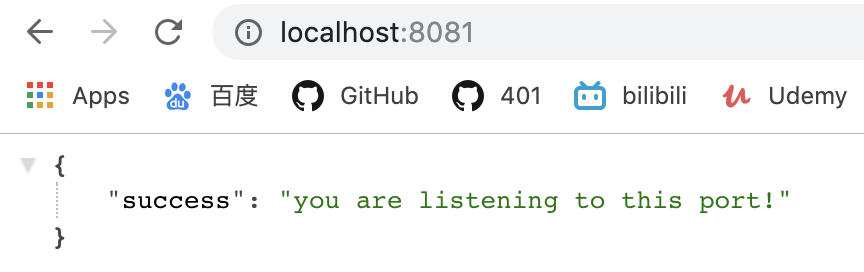
然后在客户端对服务器发出一个请求
<!DOCTYPE html>
<html lang="en">

<head>
  <meta charset="UTF-8">
  <meta name="viewport" content="width=device-width, initial-scale=1.0">
  <meta http-equiv="X-UA-Compatible" content="ie=edge">
  <title>Document</title>
</head>

<body>
  <div id="container"></div>

  <script>
    // 原生 AJAX 方法
    var xhr = new XMLHttpRequest();
    xhr.open('get', 'http://localhost:8081', true);
    xhr.send();
    xhr.onreadystatechange = function () {
      // 回调函数
      if (xhr.readyState === 4 && xhr.status === 200) {
        document.querySelector('#container').innerText = xhr.responseText;
      }
    }
  </script>
</body>

</html>
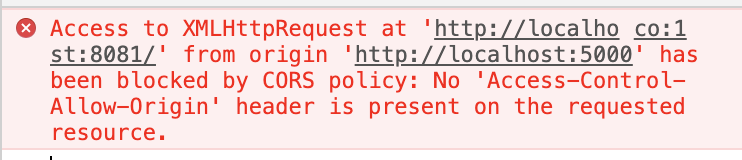
喜闻乐见地被拦截了。
接下来,我们来解决跨域的问题。