
类数组对象
Posted: 09.25.2019
类数组对象的属性
- 该对象类型为 Object,并且不为空
- 该对象具有
length属性 - 该对象的
length属性为有限非负整数
如果满足以上三种条件,那么该对象便是类数组。
检查一个对象是否为类数组
这个例子直接来自于《javascript权威指南》
其最重要的思想是:不管别的属性怎么样,最终决定性的属性还是length!!!
// Determine if o is an array-like object.
// Strings and functions have numeric length properties, but are
// excluded by the typeof test. In client-side JavaScript, DOM text
// nodes have a numeric length property, and may need to be excluded
// with an additional o.nodeType != 3 test.
function isArrayLike(o) {
    if (o &&                                // o is not null, undefined, etc.
        typeof o === 'object' &&            // o is an object
        isFinite(o.length) &&               // o.length is a finite number
        o.length >= 0 &&                    // o.length is non-negative
        o.length===Math.floor(o.length) &&  // o.length is an integer
        o.length < 4294967296)              // o.length < 2^32
        return true;                        // Then o is array-like
    else
        return false;                       // Otherwise it is not
}
检查函数的例子
const obj = {
  length: 0
}
console.log(isArrayLike(obj)); // true
const obj2 = {
  test: 'ok',
  something: 1,
  length: 1
}
console.log(isArrayLike(obj2)); // true
function arrayLike() {
  console.log(isArrayLike(arguments)); // true
}
arrayLike('test', 1, [-1, 0]);
典型的类数组:Arguments
arguments 的属性
arguments 是一个典型的类数组对象。
我们来看一下它有哪些属性:
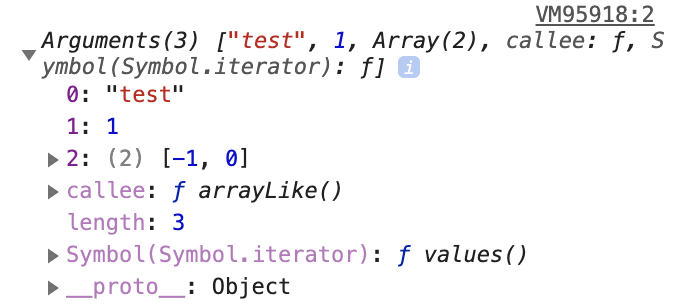
本质上,arguments 具有以下的属性:
const arguments = {
  0: 'test',
  1: 1,
  2: [-1, 0],
  length: 3,
  callee: arrayLike, // arguments 属于的函数
  /**
   * 在这里,__proto__ 对象并没有指向 Array 的 prototype
   * 而是指向了 Object 的 prototype
   */
  __proto__: Object.prototype
}
Object.prototype 的属性
我们可以看一下 __proto__ 对象具体的属性(也就是 Object.prototype 的属性)
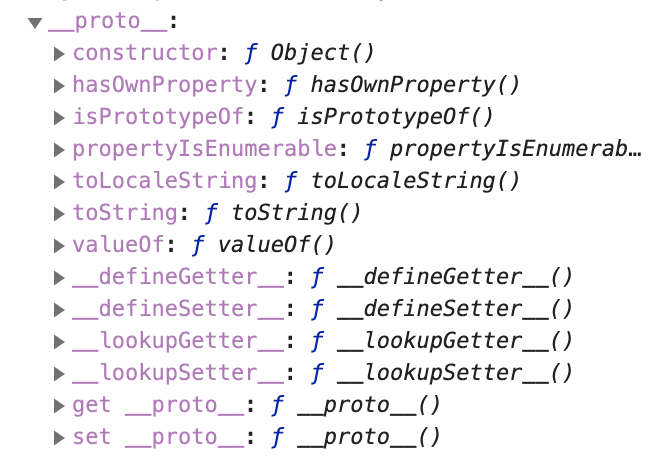
那么其实我们可以得出结论了。
为什么 arguments 没有数组的方法,比如说:forEach、push、pop... 等等
这是因为: 这些方法属于 Array.prototype,但 arguments 的 __proto__ 指向了 Object.prototype,这玩意儿可没有这些数组的方法。
别的类数组对象也是类似的。
真正的数组的属性
真正的数组的 __proto__ 对象指向了 Array.prototype
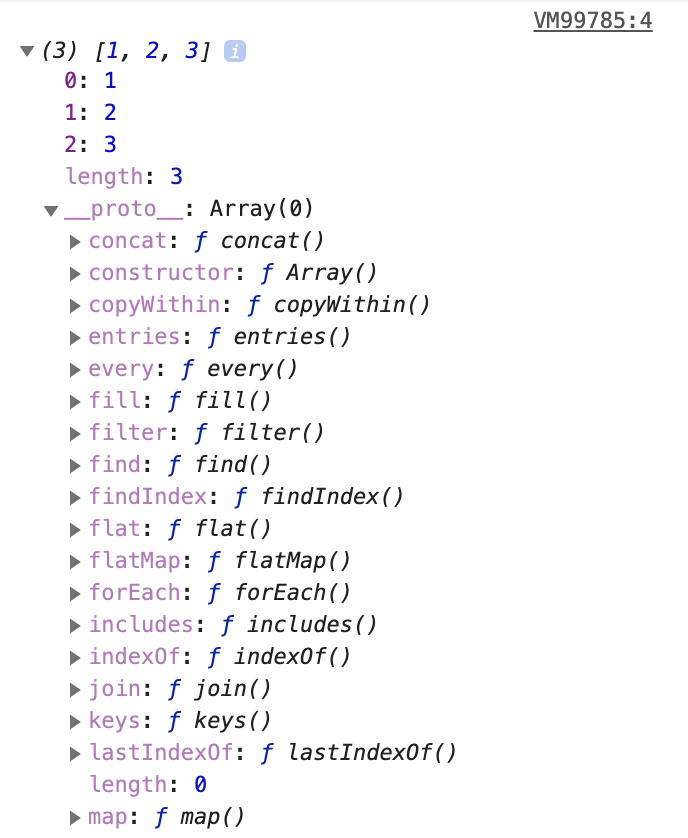
类数组转化成数组
Array.prototype.slice.call()
我们知道在没有参数的情况下,array.slice() 会返回原来的数组。
类数组对象当然没有 slice 方法。
但我们可以通过 call 来执行 Array.prototype 的 slice 方法
function arrayLike() {
  const arr = Array.prototype.slice.call(arguments);
  console.log(arr);
}

// will print ["test", 1, Array(2)]
arrayLike('test', 1, [-1, 0]);
Array.from()
这个方法存在着兼容性的问题(但很小)
- IE 这弱智玩意儿,版本11以及之前都不支持
- 别的浏览器较新的版本都支持
function arrayLike() {
  const arr = Array.from(arguments);
  console.log(arr);
}

// will print ["test", 1, Array(2)]
arrayLike('test', 1, [-1, 0]);
Spread Operator
这是 ES6 的特性
在浏览器使用前,要编译为 ES5 的代码,否则会有兼容性的问题
function arrayLike() {
  const arr = [...arguments];
  console.log(arr);
}

// will print ["test", 1, Array(2)]
arrayLike('test', 1, [-1, 0]);